Elevate Your Gmail: Free Email Signature Templates for a Professional Edge
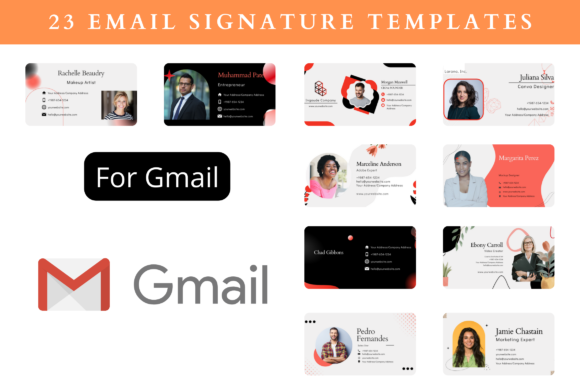
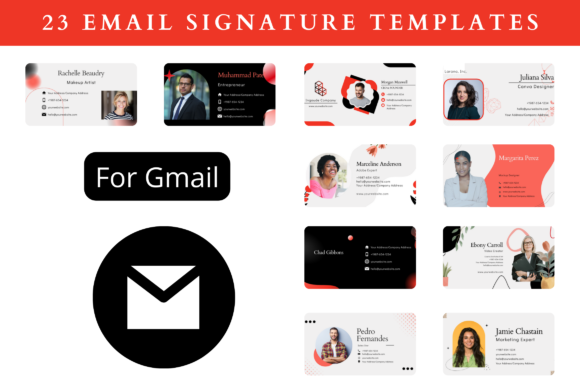
Your email signature is more than just a closing; it’s a digital handshake, a miniature billboard for your personal or business brand. For Gmail users, crafting a polished signature often involves wrestling with basic text formatting, inconsistent image sizing, and clunky HTML. This is where Free Email Signature Templates for Gmail step in, offering a streamlined solution designed to build brand authority and engage your audience without requiring a degree in graphic design. These editable templates, built in Canva, provide a high-quality, professional framework that transforms a mundane sign-off into a powerful communication tool.
Why Your Gmail Signature Deserves More Attention
In a world of crowded inboxes, consistency and professionalism are your silent ambassadors. A well-designed signature does more than list your contact details; it visually communicates your brand's personality and credibility. Think about the last time you received an email with a beautifully structured signature featuring a clean logo, cohesive colors, and clear typography. It immediately sets a tone of seriousness and attention to detail. For entrepreneurs, marketers, and small business owners, this visual hierarchy is crucial. It guides the recipient's eye from your name to your title, your website link, and a subtle call to action, reinforcing your brand identity with every message sent.
The challenge has always been execution. Creating a signature from scratch involves understanding image hosting, aligning tables in HTML, and ensuring it renders correctly across different email clients like Gmail and Outlook. These free templates eliminate that technical barrier. They are pre-designed by professionals who understand visual balance and modern typography, ensuring your signature looks sharp on both desktop and mobile screens. The result is a consistent, recognizable presence that builds trust over time, making you look more established and reliable to clients, partners, and collaborators.
Inside the Template Pack: What You Actually Get
This collection of 23 Premium Free Email Signature Templates For Gmail is built for practicality. The download is comprehensive, designed to get you from download to a live, polished signature quickly. You receive an Instructions PDF that walks you through the simple process, a Sample Signatures file for inspiration, and the crucial Editable Templates Link. This link directs you to Canva, the free online design platform where all the real customization happens. The templates are sized at a standard 400 x 200 pixels, but the beauty of Canva’s interface is that you can resize at any size without losing quality, adapting them for various needs.
The level of customization is a significant advantage. You aren’t just changing text. You have full control over the design assets that make your signature unique:
- Images: Easily upload and swap your headshot, company logo, or social media icons.
- Color & BG Color: Match your signature precisely to your existing brand palette for seamless brand identity cohesion.
- Font: Choose from a range of modern typography options within Canva to reflect your style—whether that’s a clean sans serif font for a tech startup or a classic serif font for a law firm.
- Elements: Adjust lines, dividers, and icons to create the perfect visual flow.
Once you’re satisfied, you can free to download in any format—PNG, SVG, JPG, or PDF. This flexibility is key. For email, a PNG is typically best, but having an SVG option is excellent for other web design or print projects where scalability is paramount. This pack isn’t just for Gmail; it includes templates optimized as Premium Email Signature Templates For Outlook as well, ensuring your professional appearance is consistent across all platforms.
Practical Application and Design Strategy
Choosing the right template from the set involves more than picking a favorite color. Consider your industry and audience. A creative font with a handwritten feel might be perfect for a blogger, artisan, or crafter, adding a personal, approachable touch. In contrast, a marketer or corporate professional might opt for a template featuring a bold display font for their name paired with a legible body copy, creating a strong visual hierarchy.
When customizing, apply the same strategic thinking you would to logo design or packaging design. Your signature is a microcosm of your brand. Use your brand’s primary color for key elements like your name or a call-to-action button, and a secondary color for supporting details. Ensure your chosen typeface is readable at a small size; overly ornate script fonts or handwritten fonts can become illegible. A good practice is to use a decorative font for a tagline or name, but pair it with a simple, clear sans serif font for contact details.
This resource is invaluable beyond email. The downloaded files are versatile design assets. Use them to create consistent headers for your social media graphics, incorporate them into editorial design for digital brochures, or adapt them for print materials like business cards or letterheads. The ability to resize and edit freely makes this a flexible toolkit for maintaining visual consistency across all your commercial